Clinic Assistant

An AI patient coordinator for dental, aesthetic, hair transplant and eye clinics that answers in every language on WhatsApp and Instagram, sends your treatment cards, books or arranges call-backs, and follows up after treatment.
Overview
Clinic Assistant is the patient coordinator of a dental, aesthetic, hair transplant or eye clinic, or a medical centre, on WhatsApp, Instagram and web chat. It works around the clock and in the patient’s own language, including voice messages.
It answers from your own treatment cards, doctors and locations, gets people to an appointment or a call from your team, looks after patients travelling from abroad, and checks in after treatment.
It never diagnoses and never invents a price.
Highlights
- Your treatment cards, not AI improvisation. Each treatment is a card you write: what it is, starting price, procedure time, stay, recovery and before/after photos. The assistant sends the card, so every answer stays on-message.
- Medical safety built in. No diagnosis and no reading of photos or results. Emergency wording gets your emergency number and a person, and self-harm is escalated at once. Health details are kept only when the patient agrees.
- Your way of booking. Let your call centre give the times, with the treatments and phone number collected into a call-back list with waiting times, or let the assistant book free times from your doctors’ hours itself.
Install and set up
- Install Clinic Assistant from Settings › MonoStore › Apps, or open the install link app.monochat.ai/apps/nZMMmuL9yjKMvAZc2. Without a MonoChat account, the link lets you sign up first and installs the app for you.
- Open the Get started tab on your MonoChat home page and choose Set up your clinic. The form asks for What kind of clinic? (a starting treatment list is filled in for you), the Clinic name, city, address, phone, currency, time zone, Opening hours, Your doctors and How should appointments be made? (your call centre gives the times from a call-back list, or the assistant books free times from your doctors' hours). Tick Also load sample data so I can see it full if you want every screen filled with example records. Click Save and continue.
- Open Clinic › Treatments and write your treatment cards in your own words: what it is, starting price, procedure time, stay, recovery and before/after photos. Add your Doctors and Locations, and under Welcome from ads set which ad leads to which card.
- Open Clinic in the left menu and click the green power button (Turn on) in the header. The Turn the assistant on drawer lists what will start; confirm it. The badge next to the title changes from Off to On. Only someone who can manage automations in the workspace sees the power button and can turn the assistant on or off.
- Choose Try it on your own phone on the Get started tab and message your own number the way a customer would.
- Turning the assistant on submits the WhatsApp templates its automatic messages need on your number; their approval status is shown in the app.
- A patient who writes STOP gets no more automatic messages. Sample patients are never messaged.
- Sample data fills the calendar, call-backs, the international board, follow-ups and reports so you can try everything on day one, and comes out with one click.
Features
Welcome people from your ads
Someone who taps a Click-to-WhatsApp or Instagram ad gets that treatment’s card at once. Set which ad leads to which card, or let the treatment names do it.
International patients
Country, treatment and travel dates go onto a board (new, photos, quote, date set, treated). Photos sent in the chat are counted and your coordinator is alerted when an enquiry waits too long.
Prepared visits, fewer no-shows
A confirmation, a reminder with I’ll be there, Change the time and Cancel, and the treatment’s own questions before the visit, answered in the chat and filed on the appointment.
Care after treatment
“How are you feeling?” on day 1, 3 and 7 after a procedure. A question or a written worry goes straight to your care team; happy patients get your review link.
Locations
With several clinics it asks which city and sends the address with a map pin.
Clinic screens
Calendar by doctor, appointments with pre-visit answers, call-back requests, patients, the international board, follow-ups, ratings and messages taken, plus settings for treatments, doctors, locations, welcome from ads, booking rules, automatic messages, how it talks and handover.
Clinic reports
Patients from ads, call-back speed and how many became appointments, no-shows with and without reminders, answered questions, the international pipeline by country, follow-ups that needed the care team, and ratings.
Beside the conversation
The patient’s next appointment, open call-back request, international enquiry, follow-up worries and health notes, with a button to book.
Screenshots
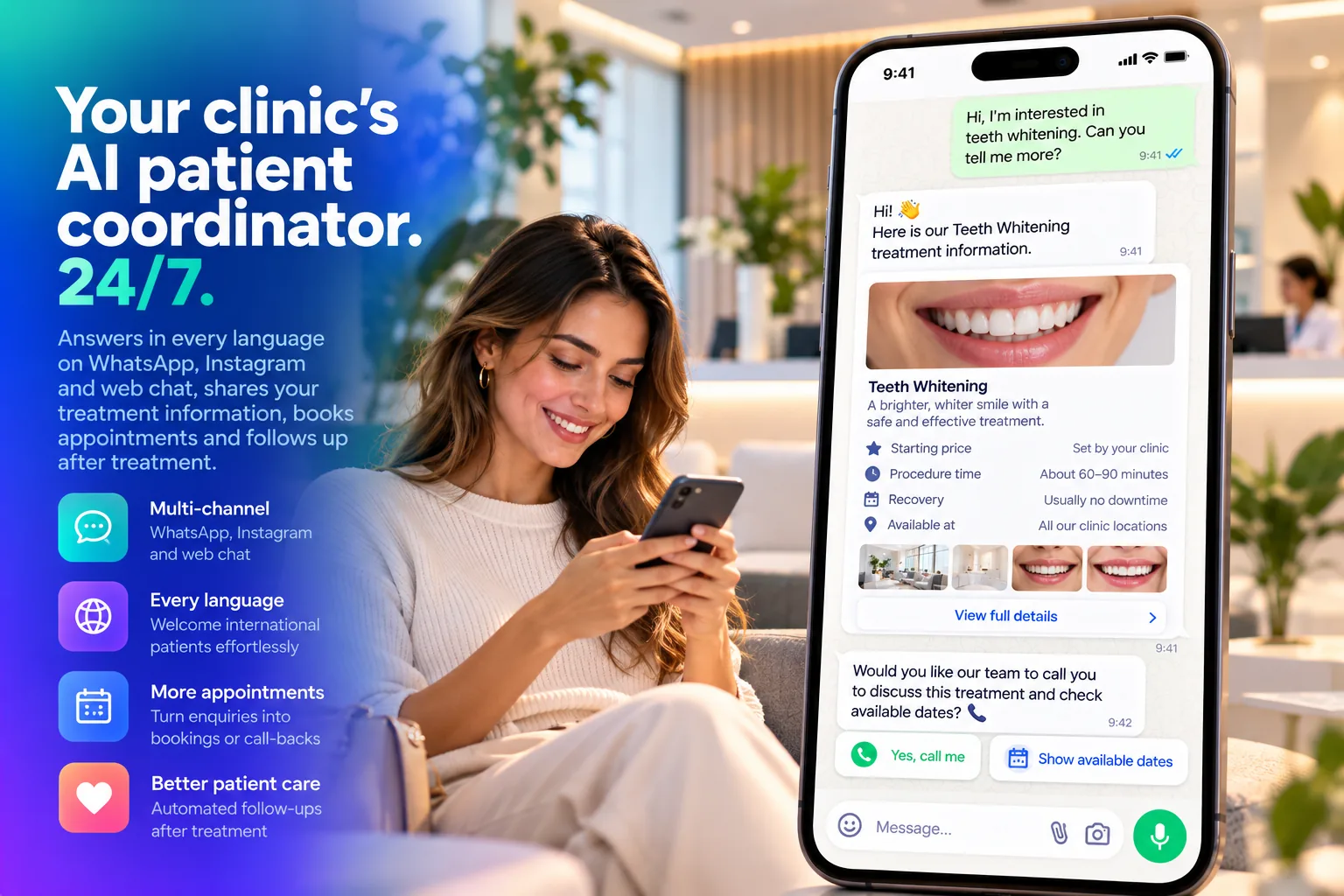 Clinic Assistant sending a teeth whitening treatment card on WhatsApp and offering a call or available dates
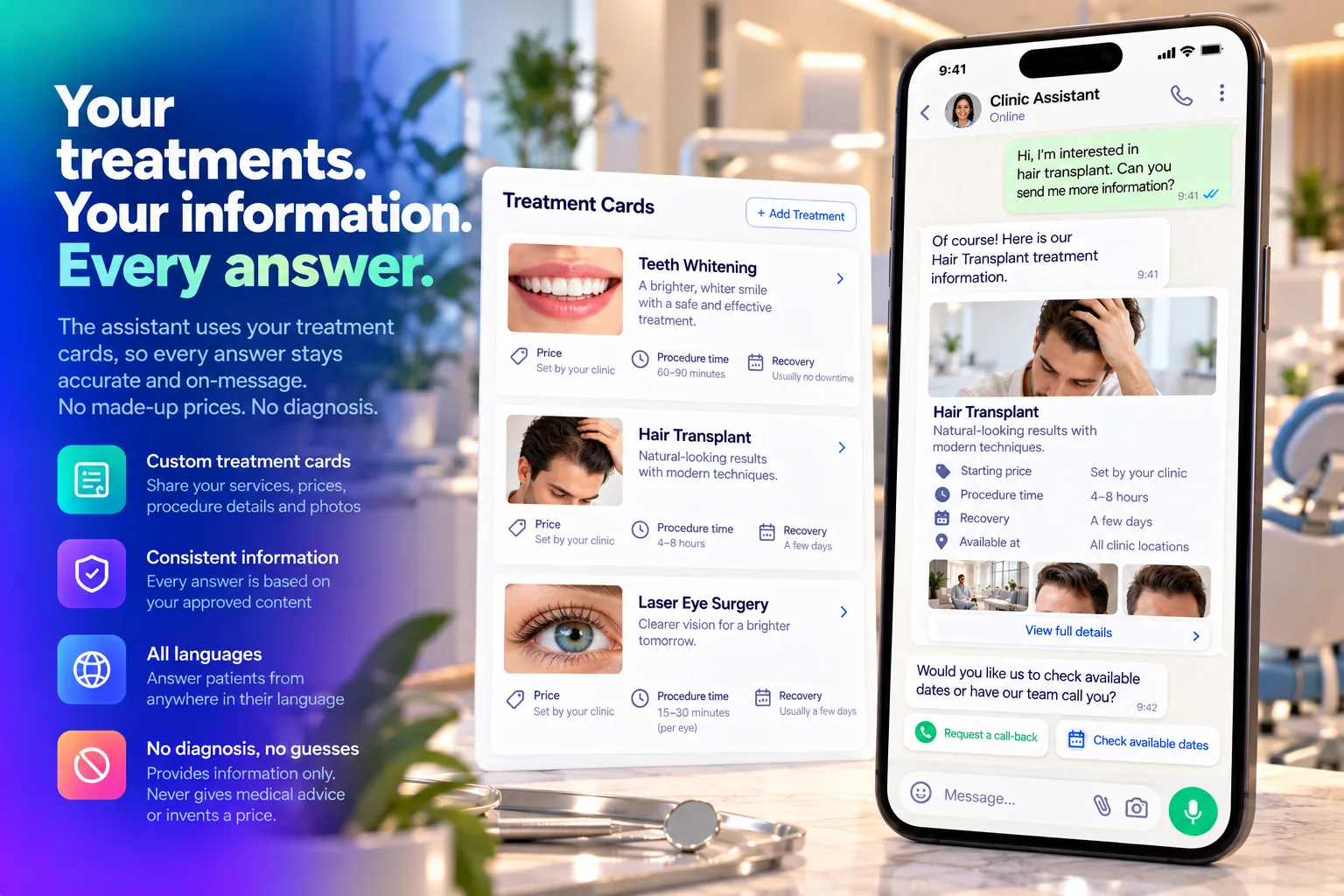 Treatment cards with starting price, procedure time and recovery, sent in the chat
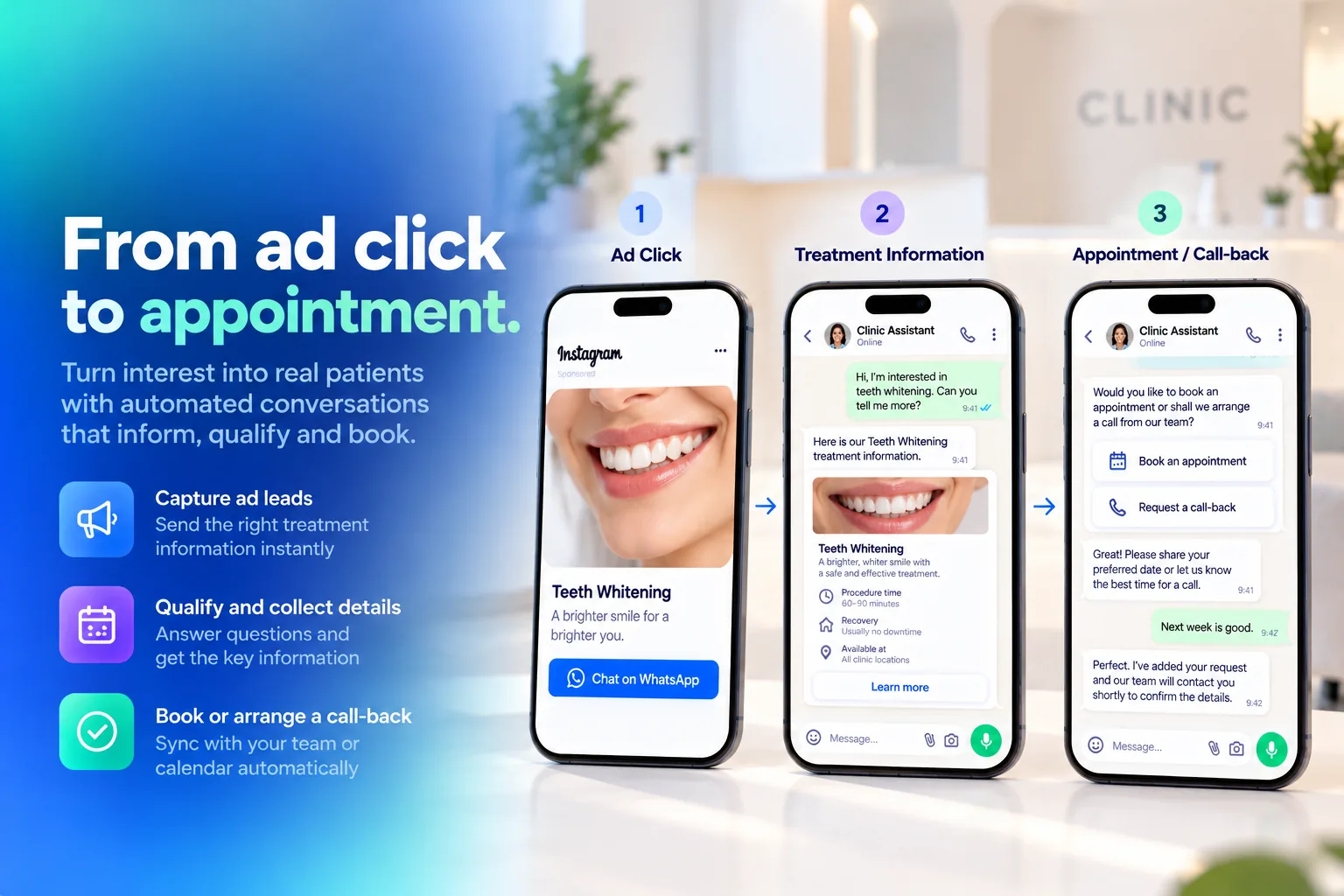 From an Instagram ad click to a treatment card and an appointment or call-back
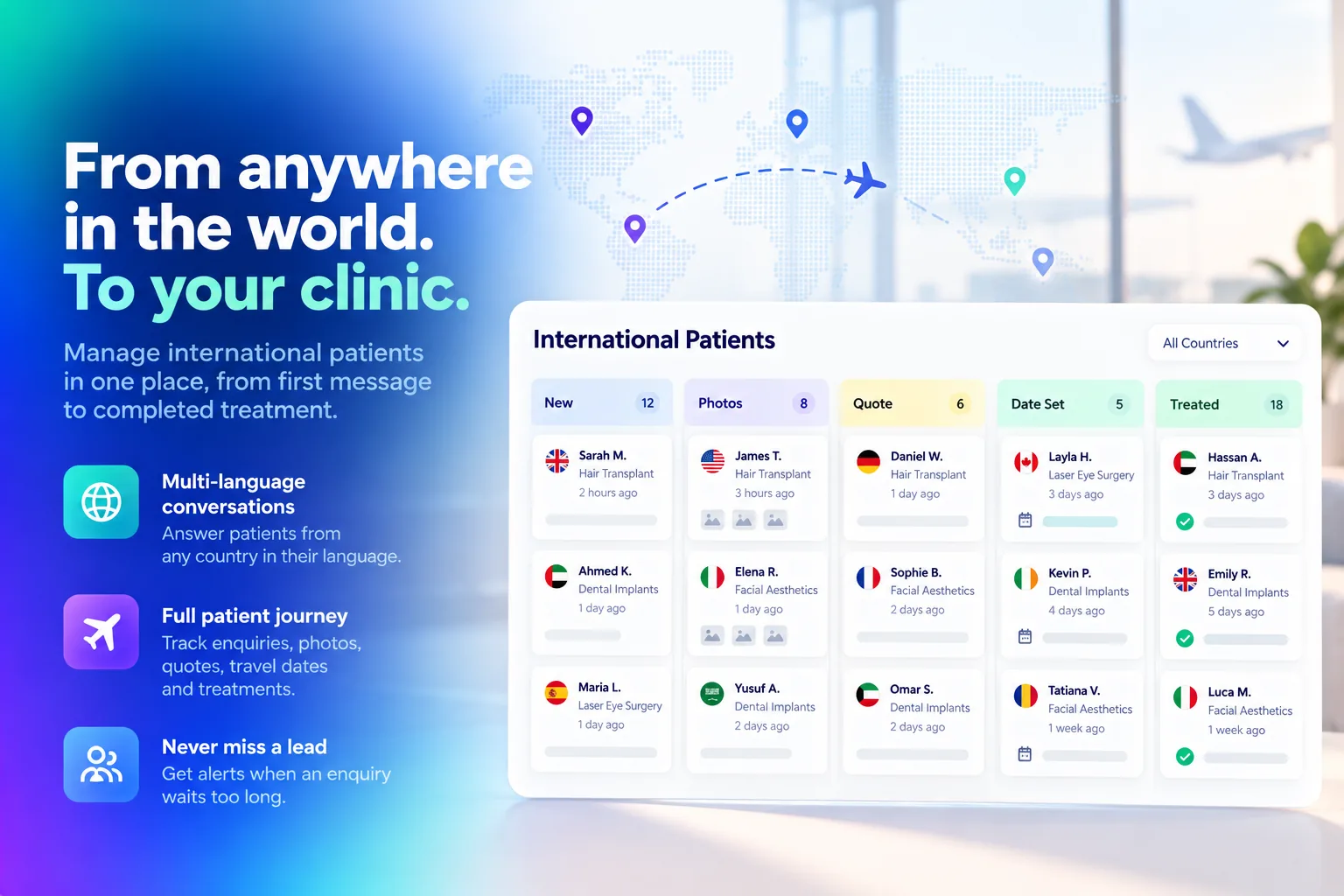 International patients board from new enquiry to treated, by country
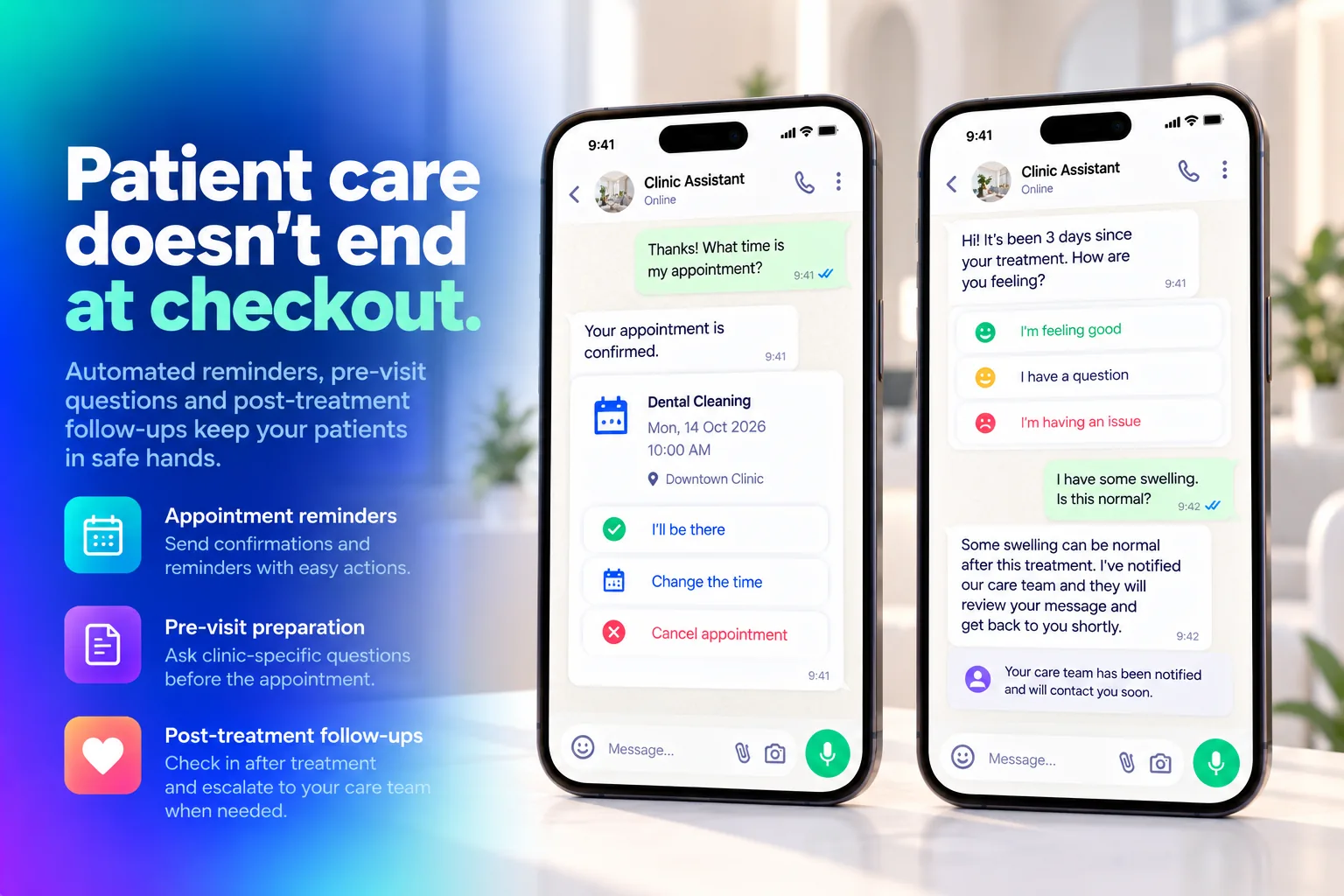 Appointment reminder with I’ll be there, Change the time and Cancel, and a check-in after treatment
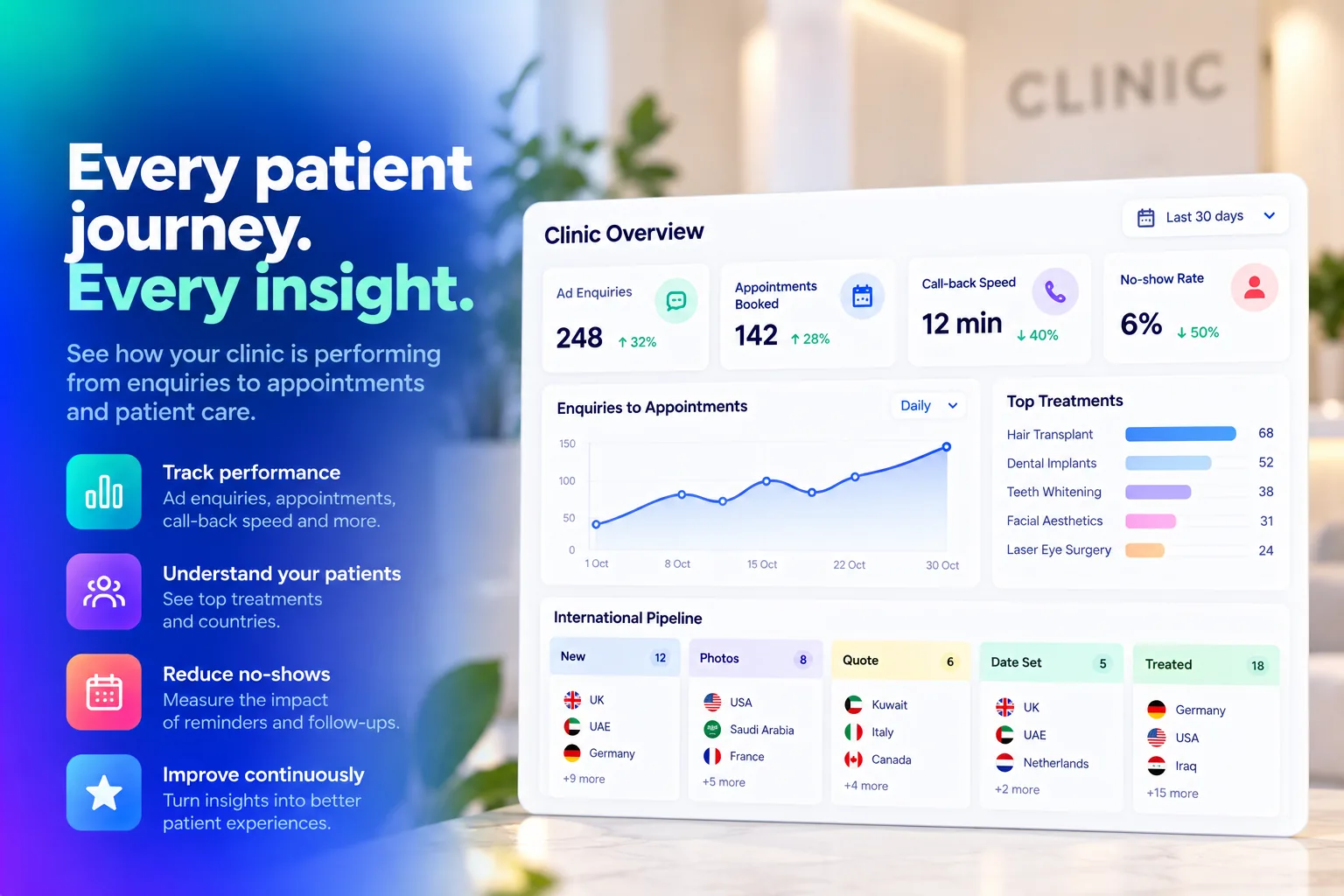 Clinic overview report with ad enquiries, appointments booked, call-back speed and no-show rate
FAQ
Which clinics is it for?
Dental, aesthetic, hair transplant and eye clinics, and medical centres. When you set it up you pick your kind of clinic and a starting treatment list is filled in for you.
Does it give medical advice?
No. It never diagnoses and does not read photos or results. It answers from the treatment cards you write, and emergency wording gets your emergency number and a person.
Can it quote prices?
Only the starting prices you write on your treatment cards. It never invents a price.
Does it book appointments itself?
You choose. It can collect the treatments and phone number into a call-back list for your call centre, or book free times from your doctors’ hours itself.
How does it handle patients from abroad?
It answers in the patient’s own language and puts country, treatment and travel dates onto the international board. Your coordinator is alerted when an enquiry waits too long.
What happens after treatment?
It asks “How are you feeling?” on day 1, 3 and 7 after a procedure. A question or a written worry goes straight to your care team, and happy patients get your review link.