Tickets
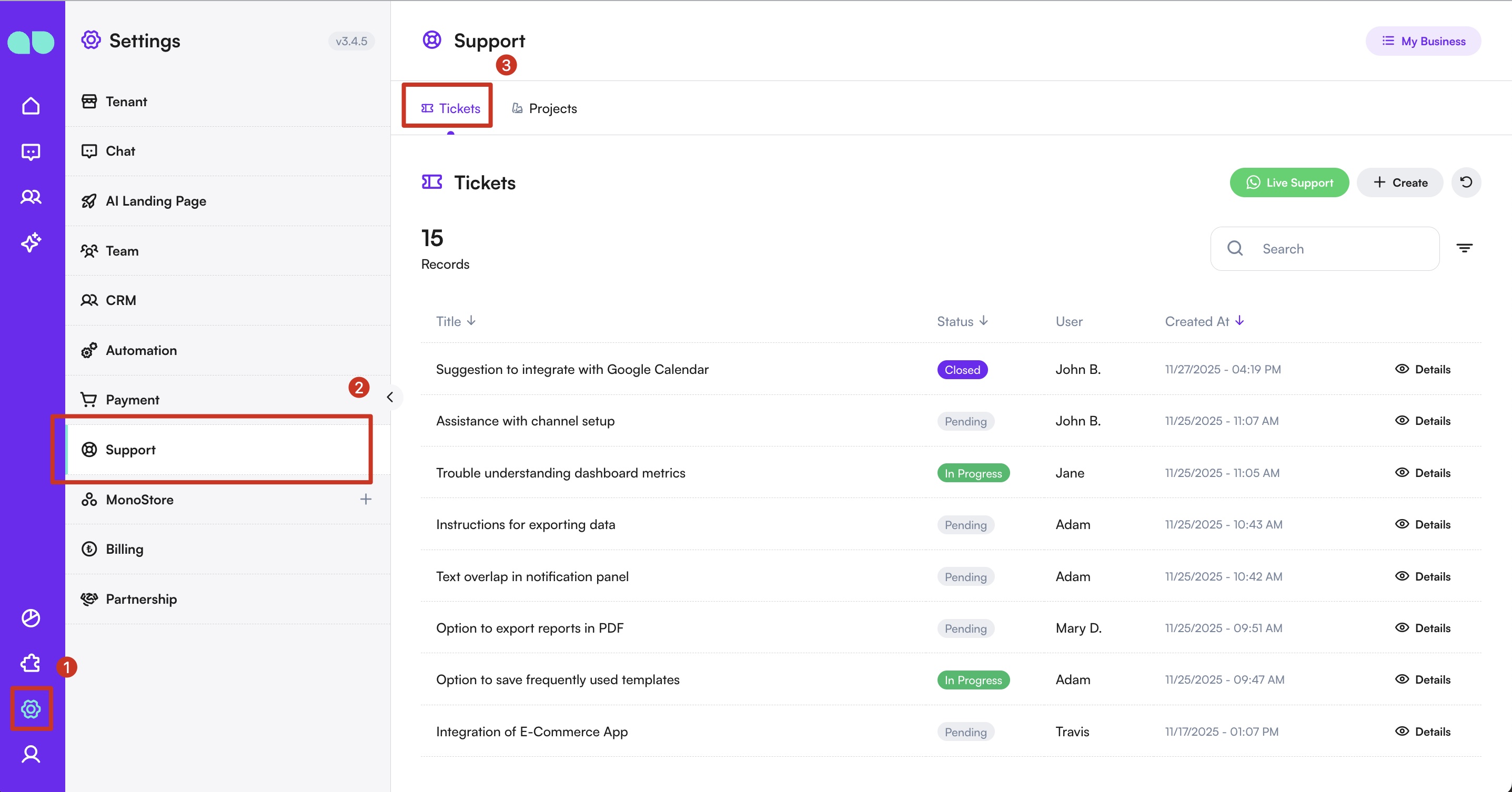
The Tickets page allows you to manage all your support requests in one place. You can track progress, create new tickets, and communicate directly with our support team or MonoAI for assistance.
Viewing Tickets
- Navigate to Tickets:
- Go to Settings > Support, then open the Tickets tab.
- Here, you will see all tickets you have requested.
- Check the status of each ticket: whether it is in progress, closed, or waiting to be processed.
-
Ticket Details:
- Click the eye icon on a ticket to view its full details.
- In the detail view, you can also see if the support team have left any comments on your ticket.
-
Live Support:
- Use the Live Support button to directly write your issue or suggestion, or contact us through our Support Channel.
- From there, either the support team or MonoAI can create tickets for you based on your inquiry.
Creating a Ticket
- Create Your Own Ticket:
- Click the Create button at the top right of the page.
- Enter a title for your ticket.
- Provide a detailed description of your issue or suggestion.
- Optionally, upload screenshots or videos to help the team understand your request better.
- Press Save to submit your ticket.
By using the Tickets page, you can ensure your issues, suggestions, or requests are tracked and resolved efficiently.